-
Frustrations with NETUM NT-1228BC Bar-code Scanner
Published: Sunday, March 8th 2026 10:46:12 AM - EDT
Updated: Saturday, March 14th 2026 01:22:26 PM - EDT
Written by: jbick
Category: ELECTRONICS
An unpleasant surprise with wireless NETUM NT-1228BC bar-code scanner. A cheat sheet on how to quickly program the scanner for data entry.
Buy Featured Items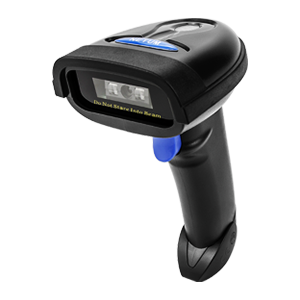
Back in 2023 I had gotten promoted into a management role and needed to provide some of my own tools for the job. I had been expected to do my entire job from a tablet as opposed to a laptop or a desktop computer. Considering how much data I had to entire in terms of PLEX check sheets, I figured I would just supply my own laptop and bar-code scanner.
At the time I was promoted my team was also dealing with a dying wireless bar code scanner. Half the time we would have to enter our own serial codes manually via keyboard. This was a pain in the rear end and very time consuming.
I went online and picked out a nice used Toshiba laptop and a couple bar-code scanners. One of the bar-code scanners I selected was a NETUM NT-1228BC. I selected that scanner because it was both wired and wireless, had a long battery life (30,000 - 60,000 scans off one charge).
The NETUM bar-code scanner came with a USB-C cable as well as a 2.4 GHz wireless USB dongle. I figured just plug it in and we could begin entering bar-codes right away. Was I in for a rude awakening!
It would turn out that the NETUM NT-1228BC scanner has a ton of features, totally unexpected. In fact, out of the box it will not actually execute the ENTER keyboard button. It will only input data and it would be up to the operator to then hit the enter button on the keyboard. Obviously this is to time consuming.
In 2026 I found myself in the same conundrum with a dying bar-code scanner supplied by my company. I figured, oh gee, I have a bar-code scanner at home that I can use. The NETUM NT-1228BC. So I took it into work for the crew to use, only to get reminded that it doesn't fully work and not only that but the cover for the wireless USB dongle broke right off upon it's removal.
Luckily for me, you are in fact able to go right on Amazon and just purchase a new 2.4 GHZ USB dongle for the scanner. I tried to weld the plastic cover onto the old dongle, with no success.
Notes About Purchasing "new" USB Dongle
A new wireless USB dongle would have to be paired up to the NETUM NT-1228BC. It's quite simple, just plug in the dongle, scan the bar-code then unplug the dongle.
It would appear the new dongle that I just purchased is of slightly better quality than that of the original USB dongle that came with the scanner back in 2023.
What I like about the NT-1228BC
- Long battery life. The scanner actually goes to sleep when not in use. I hadn't charged it in 3 years and it held a charge that whole time.
- Scans hard to read bar-codes.
- Has both wireless and wired ability.
- A lot of online support. I broke the USB wireless dongle and was able to hop online and purchase a new one. It has an awesome website with a detailed users manual.
- The fact it has so many features you can program into it via the manual.
What I don't like about it
- ENTER keyboard command not programmed in out of the box.
- The USB wireless Dongle could be built better. The cover broke right off immediately after trying to pull it out of the USB port.
- You can't wirelessly scan stuff in while the USB-C cord is plugged in. Lets say I want to charge it and scan stuff while using a separate power source. It's one or the other. You're either using the USB-C or wireless.
Programming the NT-1228BC ENTER SUFFIX
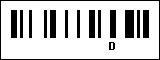
You can make the bar-code scanner execute ANY keyboard key AFTER scanning a bar-code. You have to program in a suffix to the scanner itself. There is a long user's manual but in essence you have to scan the hex characters and digits ONE at a time.
In my case, I want it to execute the enter command immediately after scanning an item. That would be the hexadecimal 0DH.
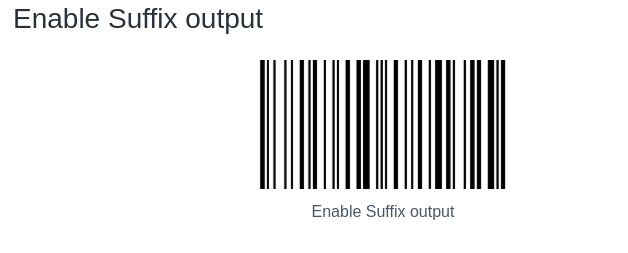
- Enable the SUFFIX by scanning the following bar-code. (Command that comes AFTER a scan)
- Scan the ADD SUFFIX bar-code.

- Scan 0
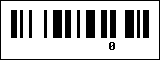
- Scan D
- Scan H
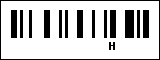
I put together a document with the steps inline. You can download the PDF here. You can just scan the bar-codes off the screen or print it out. Simply scan the bar-codes in order.
Related ELECTRONICS Posts
-
Pages
Home Page
About BP
Submit Review
Now on The GRR
Listen Now: BetterPart's own Internet Radio station is Hillsdale's Good Rock Radio The GRR!
-
 Better Parts
 -